
What if there were a service that instantly sent you new photos of your grandkids the instant they were taken? There is. One of the most popular social networks in the world, Instagram lets you share your own photos and see the photos of others you follow. If that sounds a bit like Facebook, it is and it isn’t: Instagram is all about friending and sharing, liking and commenting – but it’s entirely photocentric and never needs you to upload. Thus the name Insta-Gram.
What is Instagram?
Instagram is a free photo sharing app. You might recognize it by the signature look of images taken and shared with it – they’re square, and they often look like old Polaroids – that’s because the app includes a set of easy to use Polaroid-like filters.
Though you can access Instagram through your computer for viewing pictures, it was designed to be used with a mobile device – a tablet or smartphone. As an app, you can use Instagram to snap a photo, add an artistic-looking filter, then share that photo to your list of everyone who follows you. Or you can simply use it to look at other people’s pictures. You can also interact with photos by liking them or leaving comments, just as you would on Facebook.
Following other people is an integral part of using the app. Part of the fun of Instagram is seeing everyone’s photos – so if you’re not following anyone, using the app won’t be very exciting.
How Do I Register for Instagram?
On your tablet or smartphone, search for Instagram in the Apple App store or Android Google Play store, and download it to your tablet or smartphone.
The first time you open the app, you’ll see this screen.
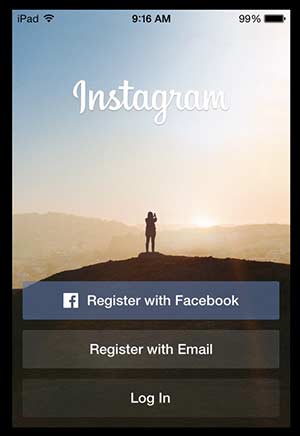
Registering with Facebook
If you already have a Facebook account, registering through Facebook is the easiest route to go. Facebook actually owns Instagram, so the two sync seamlessly. Registering with Facebook does not mean that every photo you share on Instagram will be posted to your Facebook profile; you have absolute control over which photos you choose to share that way. Using your Facebook login to register simply means Instagram will collect your Facebook account information (user name, email, etc.). Registering this way will also make it easier for you to connect with friends and family who are using Instagram. The app will let you know which of your Facebook contacts is on Instagram and will also notify you each time one of your current Facebook friends joins.
Registering with email
If you don’t have a Facebook account or don’t want to sync your Instagram with your Facebook right now (you can always do it later), you can create a new profile using your email address. You’ll also need to create a username and a password. Be sure to follow our guidelines to choosing a secure password.
Instagram only allows one username per person. Since a lot of people around the world are already using Instagram – 150 million as of September 2013 – most of the basic usernames are taken. You might have to get creative and come up with a username that incorporates different initials or numbers, like SallyM23. Or you can really creative and invent a username.
Lastly, when creating a new account you can tap the big plus sign to add your profile photo. You can either select a photo that’s already on your tablet or snap a new one.
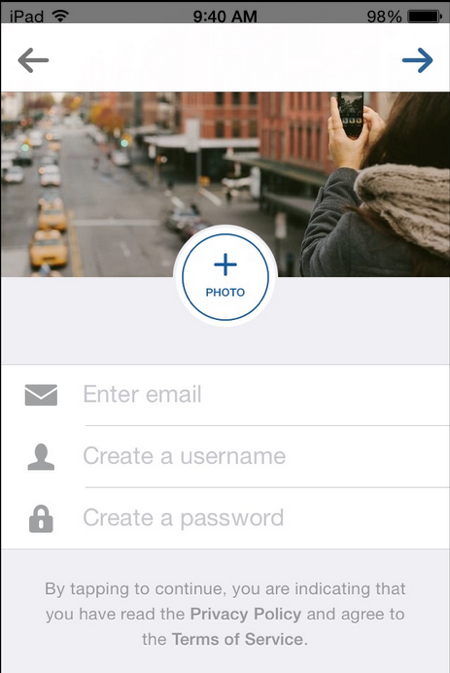
Next you’ll be asked to add your real name and phone number. These are both optional steps. The purpose of asking for this information is to make it easy for friends to search and find your profile. Instagram will not publish your phone number, but they will add your full name to your profile.
Making your Instagram account private
When you create a new account on Instagram, the default setting is public, meaning anyone can see your pictures. With a private account, friends and family will still be able to find you, but they will need to request access to follow you and view your photos. This is what your profile will look like to a stranger if you have you are private:
If you want make your account private, you’ll need to go into your settings.
To change your settings, tap “Edit Your Profile.” On this page, you can change any of your personal or private info – your name, email address, password and profile photo. You’ll need to scroll to the very bottom to change your privacy settings. Tap the slider next to “Post are Private” to change your profile to private.
When you’re done editing your profile, tap the green “Done” at the top. You’ll be asked to confirm your privacy settings next. Tap “Yes, I’m sure.”
Start following friends
Before you share your first photo, Instagram will ask you to find other people to follow. You don’t have to do this right away (just tap skip at the bottom), but it’s a good idea to start off by following at least a few people you know. You can either log into Facebook at this time or allow Instagram to search your contacts.

You’re all set!
How to View Friends’ Photos on Instagram
To see what friends and family members have been posting, you’ll want to access your feed. Just like on Facebook, your homescreen is your feed. Just click on the house icon at the bottom of your screen on the left, and you’ll see a stream of photos that people you follow have posted, along with comments people have made and “likes.” (To read how to “like” a photo, scroll down to the bottom of this article and read our Tips & Tricks.)
How to Share a Photo on Instagram
On the bottom of your screen, in the center, you’ll see a blue square. Tap that to take a photo.

Once you take a photo, you’ll see a new screen with balloons at the bottom and different names like “AMARO” and “MAYFAIR.” These are Instagram filters – they can brighten the colors of your photo and make it look more artistic. Try out different filters to see how your photo looks. You can even make your photo black and white.
Here are three variations on one photo, made using the Instagram filters:
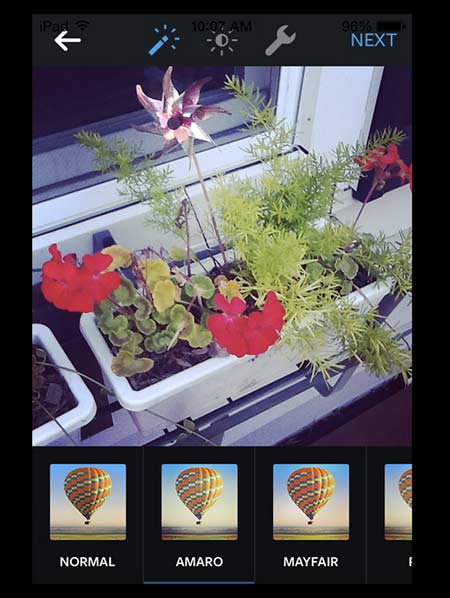
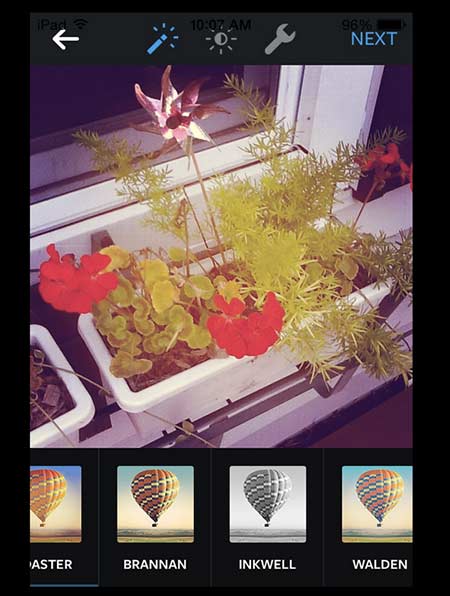
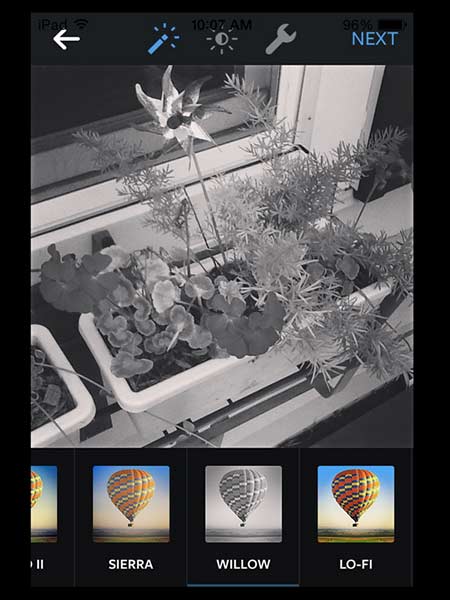
Once you’re satisfied with how your photo looks and have picked a filter you like (or you can just go with “NORMAL” and not use a filter at all), hit Next at the top right of your screen.
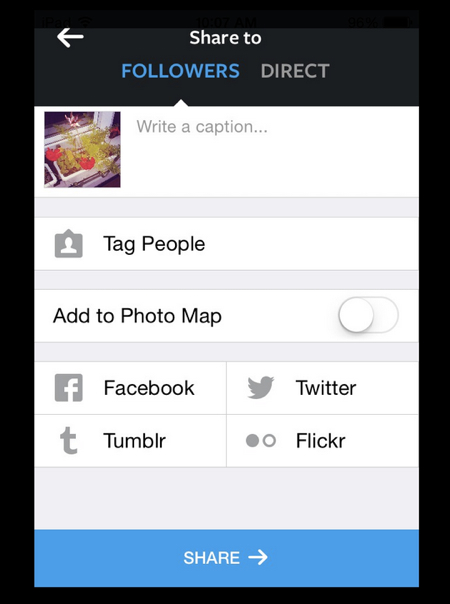
Here you can add a caption for a photo. You have a few other options like adding a location or sharing your photo to Facebook or other social networks, but none of these steps are required.
After you finish writing your caption, tap “share,” and voila: Your photo is shared.
If you want, you can also email the photo to friends and family or delete it entirely; to choose other options, look for the three horizontal dots to the bottom right of the photo. Tap that and select your option.
How to View Your Instagram Photos
Tap the icon that looks like a boxy camera on the bottom right of your screen. Right now you’ll only see one or two photos there. Once you start sharing more photos, you’ll be able to see all of them here.

How to Follow People and Browse Topics on Instagram
If you didn’t start following people when you went through the process of creating your account, here is how to find people you might know.
Explore
On the bottom left of your screen, look for a star. Tap that to visit the explore page.
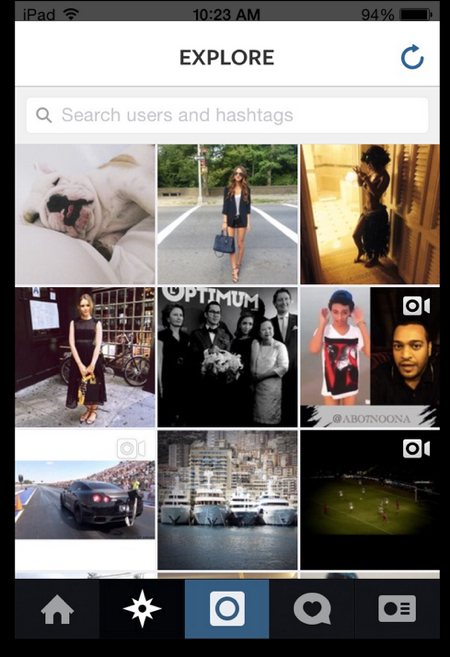
In the search bar at top, you can type in the name of someone you’re looking for, such as a friend or family member. You can also search for brands to follow on Instagram. Since this has become such a popular social network, many brands have started to create accounts to interact with their readers or fans. For example, Better Homes and Gardens, Martha Stewart and Senior Planet have Instagram profiles! You can also find Advanced Style and the Idiosyncratic Fashionistas.
Find Facebook friends or contacts
On the bottom right of your screen, tap the rectangle. This will take you to your profile. Tap the gear at the top right.
At the top of this screen, you can find people to follow by either connecting your Facebook account or by allowing the app to access your contacts.
Find Instagram-recommended accounts to follow
If you tap the heart on the bottom of your screen and you are not yet following anyone, you’ll see a screen like this.

Tap the green “Find friends to follow” button.
Once again, you’ll be prompted to connect to your Facebook account or connect to your contacts. On the bottom of this screen, tap “Instagram Suggested” to see some suggestions. Off the bat, these will likely not be people you know. These accounts are of famous photographers or publications that have several thousands of followers – and since so many other people like these accounts, Instagram thinks you might like them, too. Tap a name to check out their photos, and tap the blue plus sign to follow them and add their photos to your feed.
As you begin to follow people, Instagram will get smarter with its recommendations for you. Similar to Facebook, the app will start looking for people you have in common with the friends you already follow and will begin to recommend those.
Browsing topics
You can also pull up photos by topic – Instagram uses hashtags, just like Twitter. Go to Explore by tapping the star at the bottom of your screen. Then click on the light gray “Hashtag” button under the search bar. In the search bar, enter a hashtag. You could try “Elders” or “NYC,” for example. All the photos that people have hashtagged will come up. Click on any of the results that come up, and you’ll be taken to a stream of photos.
Sometimes, a company or organization will run a hashtag activity. They’ll ask all their followers to post Instagram photos around a particular topic during during a set time period, and add a specific hashtag. It’s a way of creating an Instagram community, and joining one of these events is a fun way to get started with Instagram.
Liking, Tagging and Other Instagram Tips & Tricks
Once you get comfortable posting photos, following people you know and using the app, here are a few “pro user” tips you can try
- To “like” a photo, simply double tap it. If you liked a photo by mistake, you can double tap to unlike it.
- You can identify someone you follow in a photo by “tagging” them. After you add a caption you can search the list of people you follow to select who you’d like to tag.
- You can add a location to a photo. After you add a caption, tap “Add location” and search nearby locations.
- Click the star on the bottom left of your screen to “explore.” You can look for other Instagram users by name or search different themes by searching hashtags.
- You can also use Instagram to film 15-second videos.
Ready? Once you’ve got the hang of Instagram and have started posting photos, try adding the hashtag #seniorplanet so we can find you!
And stay tuned for our first Senior Planet Hashtag Friday.
Happy Instagramming!




COMMENTS
7 responses to “How to Get Started on Instagram”
How do you send a Request to join someone’s live Instagram? Do you have to be logged on through Facebook?
So much fun and interesting to Instagram.
Sounds good for beginners. But everybody wants followers. To get them you have to do many things, personally I use zen-promo.com instead of it. Choose your way.
My grand kids have me on auto dial on their phones. Does that make me insta-gram?
http://www.authorjanmarsdall.com
Haha – sounds like it. Do you have filters?
Barbara, I have no filter. I blurt out whatever comes to mind.
Hugs,
( insta-Grammy Jan)
http://www.authorjanmarshall.com
Haha “Instagramma” so funny. Great article!
Sign Up for Newsletters
There’s always a lot going on in the Senior Planet universe. Get our newsletters to make sure you never miss a thing!
Sign Up Now
Join Senior Planet Community
Senior Planet Community is our social media platform designed specifically for older adult users. Engage in thought-provoking discussions, make new friends, and share resources all on a safe and ad-free platform.
Join the Conversation Today
Upcoming Online Classes
Calendar of Events
Start your week off right with a preview of the week's upcoming programs and a guided meditation session!
Start your day with a short morning stretch!
Registration required.
Where can you find cute pets, news, how-to videos, and more? YouTube, of course! Join us for an intro to YouTube.
Learn how the Nextdoor app can help you connect to neighbors and stay in the know in your neighborhood.
Get your heart pumping during this fun, high-energy workout!
This program is cancelled.
Start your day with a short morning stretch!
Like to know what's happening? Come learn about X (formerly Twitter)!
Ready to get your business noticed online? From SEO to five-star reviews, discover practical strategies to put your business on the digital map!
Follow various cues to develop body alignment and breath awareness.
Start your day with a short morning stretch!
Learn about platforms that make website building a breeze!
Are you paying for TV channels you don't watch? Learn why people are "cutting the cord" and using streaming services instead!
Learn what Podcasts are and where to find them!
Make money while decluttering with online marketplaces!
Start your week off right with a preview of the week's upcoming programs and a guided meditation session!
Start your day with a short morning stretch!
Registration required.
Ready to ditch the filling cabinet and store your documents virtually? Join this lecture on Digital Vaults to learn how!
Tired of juggling paperwork, deadlines, and day-to-day chaos? Discover the user-friendly software tools that can bring clarity, control, and peace of mind to your business.
Make money while decluttering with online marketplaces!
Activate the joints and muscles and increase mental focus during this exercise class.
Start your day with a short morning stretch!
Tour world famous museums from the comfort of your home!
Registration required.
Come learn about QR codes, augmented reality apps, and more!
Want to use AI on your phone? Come explore Google Gemini’s mobile features, from drafting messages to managing privacy.
Start your day with a short morning stretch!
Will your digital content and social media pages live on forever? Come learn about your digital legacy options!
Join Senior Planet and our tour guides from Discover Live for a virtual visit to Croatia!
Can you photoshop that? Come learn the possibilities with photo editing tools!
Get your heart pumping during this fun, high-energy workout!
Activate the joints and muscles to become limber and increase balance during this exercise class.
Start your day with a short morning stretch!
Concerned about viruses and malware? Attend this lecture to learn how to keep your device safe!
Don't want to pay for software? Learn how Google's free tools have you covered.
Curious about your family's history? Fill in the gaps using digital genealogy resources!
Start your day with a short morning stretch!
Be your own DJ with help from Spotify.
¡Venga a chatear con ChatGPT y aprenda sobre IA!
Relax your mind and strengthen your body with this gentle exercise class.
Learn how to stay safe while you surf the web!
Join this session for a fun workout that will boost your strength, flexibility, and mobility!
Need a vacation? Learn about popular websites and apps for booking vacation rentals.
Be your own travel agent with help from these online travel sites!
Leave the dictionary at home and start using digital tools that can translate on the go.
Start your week off right with a preview of the week's upcoming programs and a guided meditation session!
Start your day with a short morning stretch!
Learn tips and tricks to using your smartphone while staying safe!
Registration required.
A simple plan is better than no plan! Get to know a few free and low-cost resources that make it simple to plan your estate.
Interested in taking your cash only business into the digital age? Learn what digital payments are and how to choose among them in this lecture!
Activate the joints and muscles and increase mental focus during this exercise class.
Start your day with a short morning stretch!
Learn about platforms that make website building a breeze!
Don't want to go out? Learn about some popular apps to get food delivered to your front door.
Registration required.
Curious about AI? Come learn the basics, including how it works and considerations to keep in mind.
Start your day with a short morning stretch!
Don't overpay for internet. Learn about programs offering low-cost home internet that can help save you money.
Registration required.
Where can you find cute pets, news, how-to videos, and more? YouTube, of course! Join us for an intro to YouTube.
Learn what Podcasts are and where to find them!
Get your heart pumping during this fun, high-energy workout!
Activate the joints and muscles to become limber and increase balance during this exercise class.
Start your day with a short morning stretch!
Registration required.
Are you scam savvy? Come to this lecture to learn about fraud and scams and how to protect yourself against them.
Explore ways that tech can help you save money and manage your finances!
Learn how the Nextdoor app can help you connect to neighbors and stay in the know in your neighborhood.
Start your day with a short morning stretch!
See who you are talking to with video chat apps!
Aprenda cómo aprovechar al máximo ChatGPT y otros software de IA.
Relax your mind and strengthen your body with this gentle exercise class.
Registration required.
Goodbye floppy discs and USB drives! Learn about cloud storage options that save your files remotely.
Activate the joints and muscles and increase mental focus during this exercise class.
Start your day with a short morning stretch!
Registration required.
Make money while decluttering with online marketplaces!
Discover what you can do with online and mobile banking!
Learn how to make the most out of ChatGPT and other AI software.
Start your day with a short morning stretch!
No car? No problem! Use these apps to help you get around!
Who are Alexa and Siri? Come to this lecture to find out!
Will your digital content and social media pages live on forever? Come learn about your digital legacy options!
Get your heart pumping during this fun, high-energy workout!
Activate the joints and muscles to become limber and increase balance during this exercise class.
Start your day with a short morning stretch!
Say cheese! Learn more about your smartphone's camera.
Registration required.
Faster is not always better! Come learn about home internet options so you only pay for what you need.
Still paying for texting? Use these free apps instead.
Start your day with a short morning stretch!
¡Todo el mundo habla de IA! Asista a esta clase para ver cómo la IA es parte de la vida cotidiana.
Learn how to stay safe while you surf the web!
Join this session to turn your business idea into reality and learn about planning, research, and funding options.
Relax your mind and strengthen your body with this gentle exercise class.
Join this session for a fun workout that will boost your strength, flexibility, and mobility!
Learn how digital coupon tools can help you save money!
Can't find it in the store? Learn about shopping online!
You CAN leave home without your wallet! Learn about popular digital wallets and their many uses.
Start your week off right with a preview of the week's upcoming programs and a guided meditation session!
Start your day with a short morning stretch!
Registration required.
Concerned about privacy? Unsure about accepting cookies? Come learn about some essential privacy tips!
Interested in taking your cash only business into the digital age? Learn what digital payments are and how to choose among them in this lecture!
Get your heart pumping during this fun, high-energy workout!
Activate the joints and muscles and increase mental focus during this exercise class.
Start your day with a short morning stretch!
Ready to get your business noticed online? From SEO to five-star reviews, discover practical strategies to put your business on the digital map!
Goodbye floppy discs and USB drives! Learn about cloud storage options that save your files remotely.
Registration required.
Everyone is talking about AI! Come to this class to see how AI is part of everyday life.
Start your day with a short morning stretch!
Registration required.
Tired of resetting your password all the time? Join this lecture to discover password alternatives and different ways to manage your passwords.
Learn how the Nextdoor app can help you connect to neighbors and stay in the know in your neighborhood.
Get your heart pumping during this fun, high-energy workout!
Come learn about all that Senior Planet has to offer online!
Activate the joints and muscles to become limber and increase balance during this exercise class.
Start your day with a short morning stretch!
Goodbye Copper, Hello Fiber!
Registration required.
Overwhelmed by the choices of a new computer? We'll help you simplify so you can decide!
Are you paying for TV channels you don't watch? Learn why people are "cutting the cord" and using streaming services instead!
Start your day with a short morning stretch!
¿Podemos realmente creer lo que vemos? ¡Venga a esta clase para acostumbrarse a reconocer la IA!
Love the great outdoors? Come learn how smartphone apps can enhance your outdoor hobbies!
Relax your mind and strengthen your body with this gentle exercise class.
Registration required.
Learn how to use emojis, GIFs, and more to quickly say what you mean!
Will your digital content and social media pages live on forever? Come learn about your digital legacy options!
A simple plan is better than no plan! Get to know a few free and low-cost resources that make it simple to plan your estate.
Ready to ditch the filling cabinet and store your documents virtually? Join this lecture on Digital Vaults to learn how!
Good Morning, Senior Planet!
Morning Stretch
YouTube
Introduction to Nextdoor
Fit Fusion Workout
CANCELLED – Stronger Bones
Morning Stretch
Intro to X (formerly Twitter)
Getting Your Small Business Online
Chair Yoga
Morning Stretch
Website Builders at a Glance
Streaming & Smart TVs
Podcasts at a Glance
Intro to Selling Online
Good Morning, Senior Planet!
Morning Stretch
Digital Vaults
Essential Tech for Running Your Small Business
Intro to Selling Online
Stronger Bones
Morning Stretch
Virtual Museum Tours
Smartphone Camera Uses Beyond Photography
Using the Google Gemini App Demo
Morning Stretch
Digital Legacy at a Glance
Virtual Tour: Split, Croatia
Intro to Photo Editing Tools
Fit Fusion Workout
Balance/Strength
Morning Stretch
Anti-Virus & Malware Removal Programs At a Glance
Google Workspace
Digital Genealogy Tools
Morning Stretch
Spotify
Introducción a la IA
Taijiquan (Tai Chi)
Protecting Your Personal Info Online
Saturday Morning Boost: A Fun and Functional Workout
Introduction to Booking Vacation Stays Online
Online Travel Sites
Intro to Translation Tools
Good Morning, Senior Planet!
Morning Stretch
Safe & Savvy Smartphone Habits
Introduction to Estate Planning Resources & Tools
Digital Payments & Your Small Business
Stronger Bones
Morning Stretch
Website Builders at a Glance
Food Delivery Apps
Intro to AI
Morning Stretch
Affordable Home Internet
YouTube
Podcasts at a Glance
Fit Fusion Workout
Balance/Strength
Morning Stretch
Understanding Fraud & Scams
CANCELLED – Saving Money with Tech
Introduction to Nextdoor
Morning Stretch
CANCELLED – Video Chat
Introducción a chatear con IA
Taijiquan (Tai Chi)
Cloud Storage
Stronger Bones
Morning Stretch
Intro to Selling Online
Banking and Finance Apps at a Glance
Intro to Chatting with AI
Stronger Bones
Morning Stretch
Intro to Selling Online
Banking and Finance Apps at a Glance
Intro to Chatting with AI
Morning Stretch
Ridesharing Apps
Voice Assistants
Digital Legacy at a Glance
Fit Fusion Workout
Balance/Strength
Morning Stretch
Intro to Smartphone Photography
Understanding Internet Plans
Messaging Apps
Morning Stretch
Usos cotidianos de la IA
Protecting Your Personal Info Online
Turning a Business Idea Into Reality
Taijiquan (Tai Chi)
Saturday Morning Boost: A Fun and Functional Workout
Digital Coupon Tools
Online Shopping
Introduction to Digital Wallets
Good Morning, Senior Planet!
Morning Stretch
Intro to Managing Your Privacy
Digital Payments & Your Small Business
Fit Fusion Workout
Stronger Bones
Morning Stretch
Getting Your Small Business Online
Cloud Storage
Everyday Uses of AI
Morning Stretch
Passwords, Passkeys, and More
Introduction to Nextdoor
Fit Fusion Workout
Virtual Orientation to Senior Planet
Balance/Strength
Morning Stretch
Staying in Touch as Landlines Change
How to Choose a New Computer
Streaming & Smart TVs
Morning Stretch
¿Es eso IA?
Outdoor Adventure Apps
Taijiquan (Tai Chi)
Emojis, GIFs, and more!
Digital Legacy at a Glance
Introduction to Estate Planning Resources & Tools
Digital Vaults
Recent Articles
Recent Comments